For UK internet users
They want a selfie.
Who keeps it?
You haven’t typed a word or uploaded a photo, but the form already has your IP address. MAD VPN lets you choose which address the site sees before you open it.
Before you open the form
Switch on MAD before you open the page and the form receives the VPN server’s IP. If you decide to upload a selfie, the verification provider still receives that photo.
In the MAD account, add your iPhone, choose Frankfurt and download the profile. Import the file into WireGuard and switch it on.
Before you upload a photo
Find the company that runs the check. Its privacy notice should tell you who gets the image and how long they keep it. You can read that before opening the camera.
- IP address
- Your browser sends a request as soon as you open the form. A VPN changes the address attached to that request.
- Account
- If you’re signed in, the site can link the visit to your account. A saved cookie can also identify a returning browser.
- Selfie or ID scan
- The image goes to the provider when you submit it. If you’ve already sent one, contact that provider about deletion.
Online Safety Act
An age check does not always mean a passport
UK age-assurance rules do not prescribe one universal ID method. Ofcom lists several approaches, including age estimation and digital identity services. What you are asked to share depends on the provider.
Ofcom: methods and privacy ↗Choose a server location
You can use the same city on your phone and laptop. Each device has its own profile, so you can replace one without setting up the other again.
- GermanyFrankfurt
- CanadaToronto
- Southeast AsiaSingapore
One account for up to five devices
Your phone and laptop each get their own profile. If you lose a device, you can disable its profile from your account and carry on using the others.
Use the official WireGuard app on iPhone, Android, Mac, Windows or Linux. Once your profile is in the app, you can switch the VPN on and off there.
Find setup help for your device ↗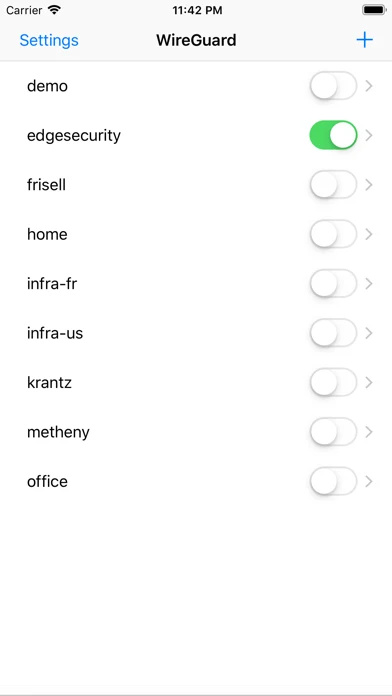
How to connect
Open your MAD account
Use the email address you paid with and enter the sign-in code we send you.
Add your device
Choose a server location and create a profile. Download the configuration file and import it into WireGuard.
Switch on WireGuard
Switch on the profile before you open the form. The site will see the VPN address on your next request.
Customer reviews
I work from cafés a few days a week and wanted a VPN for shared Wi-Fi. Setting it up on my laptop took a little attention, but now I just switch it on in WireGuard before I start working.
I needed a VPN for my phone and laptop. Having separate profiles under one account makes it easy to manage both, and there’s room for my tablet too.
Read 10 more reviewsShow fewer reviews
I wanted one plan for my phone and laptop. Having both in the same account makes it easy to keep track.
The annual price is clear. I know what I’m paying today and when it renews.
I hadn’t used WireGuard before. I followed the guide, imported my file and connected.
The seven-day pass was exactly what I needed for a short trip. One payment, no renewal, and no subscription to cancel when I got home.About the seven-day Trip Pass on the main MAD VPN site.
A website I needed wouldn’t open on the network I was using. Connecting through Frankfurt got me in. Importing the profile into WireGuard was new to me, so that part took a few minutes.
I check regional versions of websites for work. Having connections in Canada, Germany and Singapore is useful for seeing what visitors in those locations get.
I wanted websites to see a VPN address instead of my home IP. This does the job. I’d like an easier way to switch locations, but once the profile is set up, connecting is straightforward.
I’d never used WireGuard before. Followed the guide, imported the file from my email and connected. I expected more setup than that.
I only need a VPN occasionally, so being able to cancel renewal myself matters. Found the option in my account without having to contact support. Access stays available for the time I’ve paid for.
Lost my phone and needed to disable its VPN profile. I could do that from my account and keep using the connection on my laptop. Glad I didn’t have to set everything up again.
Frequently asked questions
Can MAD delete a photo I’ve already sent?
Only the service that received the photo can handle that request. Look for its contact details in the privacy notice on the form.
Can a site still recognise me?
Yes. A VPN does not stop cookies or browser fingerprinting. A site can also recognise the account you sign in to.
What does MAD keep?
We process account and payment details, device profiles, connection information and aggregate traffic counts. Our site also uses analytics and advertising tracking. Privacy policy ↗
Where can I cancel renewal?
Open My account to manage your subscription. For the 24-hour plan, cancel before the first day ends to avoid the monthly charge.
Choose how long to use MAD
All four plans give you the same locations and device allowance. Choose the billing period that suits you.
Choose your plan
Three locations. Up to five devices on every plan.