For UK internet users
It opens for them.
Why not for you?
The photo opens for everyone else in the group chat. On your phone it says “Unavailable in your region”. With MAD VPN you can reopen the same link through Frankfurt and see whether location is the issue.
The same link from Frankfurt
We opened Cloudflare’s location check from a London test connection and from MAD’s Frankfurt server. The same page returned GB in London and DE in Frankfurt. Each site decides what visitors in that location can see.
What happened when we tried an Imgur link?
On 20 November 2026 we requested the same Imgur drawing from both locations. London received a “too many requests” error (429). MAD’s Frankfurt server received the picture. The London response didn’t say whether location played a part.
In the MAD account, add your iPhone, choose Frankfurt and download the profile. Import the file into WireGuard and switch it on.
What does the error say?
Keep the original link handy. The message on the page tells you whether changing your connection is worth a try.
- “Unavailable in your region”
- A site can use your IP to decide which page to serve. Connect through Frankfurt and retry the original address. Some sites also check account location.
- “404: page not found”
- Check the spelling or ask the sender to reopen the link. If the page has been taken down, a different VPN location cannot bring it back.
- “Sign in to continue”
- Open the link in the account that has permission to view it. A private post or a paid article still needs the right account.
Site availability
Why an Imgur picture can disappear in the UK
Some sites have withdrawn UK access. An image hosted by one of them can disappear from a post even when the rest of the page loads.
Imgur stopped serving UK visitors on 30 September 2025. Its notice covers shared links and pictures embedded on other sites. Imgur’s notice ↗
Choose a server location
Frankfurt is the closest MAD server to the UK. Choose Toronto to try a Canadian IP, or Singapore for an IP in Southeast Asia.
- GermanyFrankfurt
- CanadaToronto
- Southeast AsiaSingapore
One account for up to five devices
Your phone and laptop each get their own profile. If you lose a device, you can disable its profile from your account and carry on using the others.
Use the official WireGuard app on iPhone, Android, Mac, Windows or Linux. Once your profile is in the app, you can switch the VPN on and off there.
Find setup help for your device ↗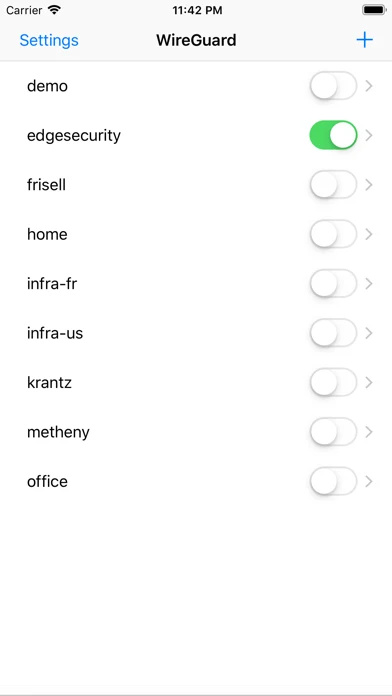
How to connect
Open your MAD account
Use the email address you paid with and enter the sign-in code we send you.
Add your device
Choose a server location and create a profile. Download the configuration file and import it into WireGuard.
Switch on WireGuard
Switch on your profile, return to the chat and tap the original link again.
Customer reviews
A website I needed wouldn’t open on the network I was using. Connecting through Frankfurt got me in. Importing the profile into WireGuard was new to me, so that part took a few minutes.
I check regional versions of websites for work. Having connections in Canada, Germany and Singapore is useful for seeing what visitors in those locations get.
Read 10 more reviewsShow fewer reviews
I wanted one plan for my phone and laptop. Having both in the same account makes it easy to keep track.
The annual price is clear. I know what I’m paying today and when it renews.
I hadn’t used WireGuard before. I followed the guide, imported my file and connected.
I work from cafés a few days a week and wanted a VPN for shared Wi-Fi. Setting it up on my laptop took a little attention, but now I just switch it on in WireGuard before I start working.
The seven-day pass was exactly what I needed for a short trip. One payment, no renewal, and no subscription to cancel when I got home.About the seven-day Trip Pass on the main MAD VPN site.
I needed a VPN for my phone and laptop. Having separate profiles under one account makes it easy to manage both, and there’s room for my tablet too.
I wanted websites to see a VPN address instead of my home IP. This does the job. I’d like an easier way to switch locations, but once the profile is set up, connecting is straightforward.
I’d never used WireGuard before. Followed the guide, imported the file from my email and connected. I expected more setup than that.
I only need a VPN occasionally, so being able to cancel renewal myself matters. Found the option in my account without having to contact support. Access stays available for the time I’ve paid for.
Lost my phone and needed to disable its VPN profile. I could do that from my account and keep using the connection on my laptop. Glad I didn’t have to set everything up again.
Frequently asked questions
Will MAD fix a deleted link?
MAD cannot recover a deleted page. Ask the sender for a new link or a copy of the file.
What if the site still shows the same error?
Some sites block VPN addresses or use the country on your account. In either case the message can stay the same after you switch servers.
Can I choose a UK server?
MAD has servers in Germany, Canada and Singapore. There’s no UK location.
Where can I cancel renewal?
Open My account to manage your subscription. For the 24-hour plan, cancel before the first day ends to avoid the monthly charge.
Try your link through Frankfurt
The day plan includes all three locations. If you only need it today, cancel renewal before the first 24 hours end.
Choose your plan
Three locations. Up to five devices on every plan.